Google Search Console Impression Bug: What It Means for Your Small Business
Short version: Google has confirmed that a long-running bug in Search Console inflated impression data since 13 May 2025. As they fix it, your reported impressions will likely drop — but don’t panic. Nothing about your actual visibility or traffic has suddenly got worse.
If you run a small business and keep an eye on your website performance, this update might feel a bit unsettling at first. One day your numbers look strong, the next they dip — and you’re left wondering what’s gone wrong. The good news? Probably nothing at all. This is a reporting issue, not a ranking or traffic issue.
Google has confirmed that due to a logging error, impression counts in Search Console were higher than they should have been for quite some time. Now that they’ve identified the problem, they’re rolling out a fix. As that happens, impression numbers will adjust downward to reflect reality more accurately.
In this post, we’ll break down what’s happened, what impressions actually are, how this affects your data, and — most importantly — why small businesses don’t need to lose sleep over it. We’ll also look at how to keep using Search Console confidently moving forward.
What Happened: The Google Search Console Bug Explained
Let’s start with the basics. Google has confirmed that since 13 May 2025, Search Console has been overcounting impressions due to a logging error. This means that when your website appeared in search results, it may have been counted more times than it should have been.
This wasn’t something you could see or fix on your end. It was happening behind the scenes in Google’s reporting systems. The data looked normal — graphs went up and down, trends seemed believable — but the raw numbers were slightly inflated.
Now that Google has identified the issue, they’re rolling out a correction. According to their official documentation, performance reports (including Search, Discover, and Google News) will begin to reflect more accurate impression counts. You can read more about how performance reports work in the Google Search Console Performance Reports documentation.
Here’s the key point: your website’s performance hasn’t suddenly dropped. What’s changing is how impressions are counted and reported.
So if you notice a dip in your graphs over the coming weeks, it’s not because fewer people are seeing your site. It’s because the numbers are now more accurate.
For small business owners, this is a classic case of data catching up with reality. The tricky bit is that it can look like a problem if you’re not aware of what’s changed.
What Is an Impression (and Why It Matters)?
Before we go any further, it’s worth clearing up what an impression actually is — because it’s one of those terms that gets thrown around a lot.
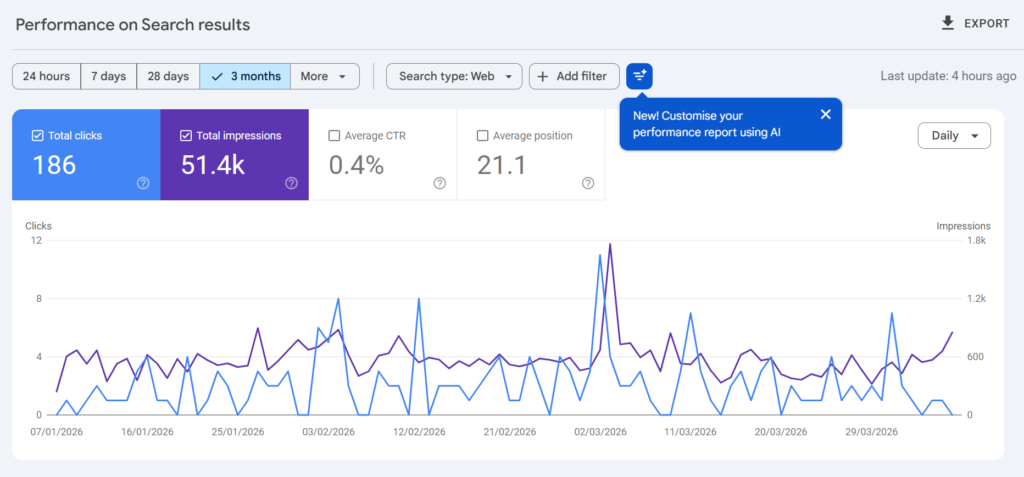
An impression is counted when your website appears in Google’s search results for a user. That’s it. It doesn’t mean they clicked your site. It doesn’t mean they even noticed it. It simply means your page was shown as an option.
For example, if someone searches for “best coffee shop in Winchester” and your website appears on page one, that counts as an impression — even if the user scrolls past without clicking.
Impressions are useful because they give you a sense of visibility. They help answer questions like:
- Are my pages showing up in search at all?
- Am I appearing for more keywords over time?
- Is my content reaching a wider audience?
However, impressions on their own don’t tell the full story. A high number of impressions with very few clicks could mean your titles or descriptions need work. On the other hand, steady impressions with rising clicks is usually a good sign.
This is why many small business owners use impressions as a top-level indicator. It’s not the only metric that matters, but it helps you see whether your site is gaining or losing visibility.
And this is exactly why the recent bug matters. If impressions were inflated, then your baseline — the number you’ve been comparing against — wasn’t quite accurate.
But don’t worry. That doesn’t make your past data useless. It just means you need to interpret it with a bit of context.
What the Fix Means for Your Data
As Google rolls out the fix, you’ll likely notice a drop in reported impressions. This is expected, and it’s happening across the board.
Here’s what’s important to understand: this drop is not a real-world decline. It’s simply a correction.
Think of it like this. Imagine you’ve been weighing ingredients on a set of scales that were slightly off. Everything looked fine at the time, but now you’ve switched to a more accurate set. The numbers change — but the ingredients themselves haven’t.
That’s exactly what’s happening here.
For small businesses, this can feel a bit jarring, especially if you’re reporting performance to clients, partners, or even just tracking your own progress. A sudden dip can raise questions like:
- Have my rankings dropped?
- Is my SEO strategy failing?
- Do I need to change something urgently?
In most cases, the answer is no.
If your clicks and conversions remain stable, then your site is performing just as it was before. The only thing that’s changed is how impressions are counted.
It’s also worth noting that this correction won’t happen all at once. Google has said it will roll out over the coming weeks, so you might see gradual changes rather than a single sharp drop.
This can make graphs look a bit messy for a while. Trends may flatten or shift slightly, but that’s just part of the transition.
The key is to stay calm and focus on the bigger picture.
Why You Shouldn’t Worry About Comparing Time Periods
One of the biggest concerns small business owners have is whether this change makes their historical data unreliable. After all, if impressions were inflated before, how can you compare last year to this year?
Here’s the reassuring bit: you can still compare time periods — you just need to be aware of the context.
The inflation affected data consistently over time. That means trends, patterns, and relative changes still hold value. For example:
- If your impressions doubled over six months, that growth trend is still meaningful.
- If certain pages consistently outperformed others, that insight still stands.
- If seasonal spikes occurred, they’re still relevant.
What changes is the absolute number, not the overall direction.
Once the fix is fully rolled out, you’ll effectively have a new baseline. From that point onwards, comparisons will be cleaner and more accurate.
During the transition, it’s best to avoid making big decisions based solely on impression changes. Instead, look at:
- Clicks
- Click-through rate (CTR)
- Conversions
- Actual business outcomes
These metrics are far more important when it comes to judging performance.
In other words, don’t let a reporting tweak shake your confidence. Your website hasn’t suddenly become less visible overnight.
How Small Businesses Should Respond
So what should you actually do about all this?
The short answer: not much.
This isn’t a problem you need to fix, and it’s not something that requires a change in strategy. However, there are a few sensible steps you can take to stay on top of things.
First, make a note of the timing. If you track your performance regularly, it’s worth marking this period so you remember why the data shifted. This will save confusion later on.
Second, communicate clearly if you report to others. Whether it’s clients, colleagues, or stakeholders, explain that the drop in impressions is due to a Google reporting correction, not a performance issue.
Third, focus on what really matters. Impressions are useful, but they’re not the end goal. Your priority should always be:
- Getting relevant traffic
- Turning visitors into customers
- Growing your business
If those things are still happening, then you’re on the right track.
Finally, use this as a reminder to take a balanced approach to data. No single metric tells the whole story. The more you understand how different metrics work together, the more confident you’ll feel when changes like this come along.
If you want to build a stronger understanding of Search Console, it’s worth exploring guides like Google Search Console tips and insights for small businesses, which break things down in a practical, easy-to-follow way.
Looking Ahead: Better Data, Better Decisions
While this situation might feel frustrating, there’s actually a positive side to it. Once the fix is fully in place, you’ll be working with more accurate data.
That means clearer insights, better decision-making, and a more reliable picture of how your website is performing.
For small businesses, this is a good thing. It levels the playing field and helps you focus on what really matters — attracting the right audience and turning them into customers.
It’s also a reminder that even the biggest platforms aren’t perfect. Bugs happen. Data isn’t always flawless. The key is knowing how to interpret what you’re seeing.
If you keep your focus on trends, context, and real-world results, you’ll be in a strong position no matter what changes come your way.
And if your impression numbers drop in the coming weeks? You’ll know exactly why — and you won’t lose sleep over it.
About the Author
John K Mitchell has been optimising websites for search engines since 1997 — before Google even existed. With a strong programming background, John quickly realised he could analyse search results and make informed decisions about why websites ranked the way they did. Over the years, he has worked on thousands of websites, often achieving strong, consistent results. His practical, no-nonsense approach helps small businesses understand search engine optimisation without the jargon, focusing on what actually works in the real world.